HP Deskjet D1530 Review
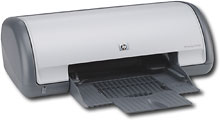 HP Deskjet D1530
Hewlett-Packard’s Deskjet D1530, is a low end personal printer that often gets bundled with their Slimline series of products. Despite being on the lower scale of home printers currently available for people who do not print too often and need a quick easy solution the D1530 is a decent fit. This would not however be a good printer for either someone who prints a lot, or needs a rich set of features.
Installation of this printer is fairly quick and painless, once you have everything you need that is. First, the printer only ships with color ink, that’s fine if all you want to do is print in color, but most of us require black ink for the majority of what we print. Thankfully, ink cartridges for this printer are not very expensive; just make sure you pick one up before heading home. Second, as with most printers these days they do not ship with the required USB cable to actually connect it to your computer. This is not something unique to HP, just a fact about most modern printers. So, along with the ink, make sure you pick up a USB A to USB B cable. If you have trouble finding one ask a sales associate, any store selling a printer will have these cables it’s just a matter of tracking them down. Try to get a cable at least 10 feet (3.1 meters) in length if not longer. It may seem like a lot up front, but trust that the extra length will come in handy if you need to route cables behind a desk or move the printer to a different location. Finally, if this is your first printer you will want to print up some paper as well as this printer does not even come with a sample pack. Multifunction paper works just fine, but pick up whatever your preference is.
Once you have the supplies in tow, setup as mentioned earlier is quick and painless. Follow the quick start guide, it has pictures and a step by step guide that unless there was a defect with the device itself should go off without a hitch. From there, you should be able to print away. While not the quietest printer, the D1530 is not obnoxiously loud, but it will click and clack around a bit, so if you are going to print on a regular or semi regular basis you may want to move the printer just a little further away. You did pick up the slightly longer cable right? Again, this is more a matter of preference that only you will be able to decide on after setting it up and hearing for yourself what it sounds like.
A few issues to keep in mind, the ink cartridges are fairly small, and the color comes in one unit, unlike some fancier models that split out the color cartridges. This means that if you print with any sort of regularity your ink will not last too long. As they are not too expensive if you find that you run out more often than not, it might be worth the investment to keep an extra on hand, at least of black ink, so you never get caught not being able to print. Also, the paper tray is not very large and double as both intake and outtake. Try not to print more than ten pages at once, or if you do stay close by and when they start to pile up carefully but quickly take the already printed pages and move them to the side.
With the limitations on printing larger jobs or printing regularly, this printer is ideal only for those that need only the occasional print job. Couple that with a little bit higher price, this printer is fine if you are getting it on sale or in a bundle, but for just a little more one can purchase a much more capable printer with better features and print handling. Still, for a cheap printer that is not going to be used heavily this manages to do the job just fine.
Specifications
• 1 Year Warranty
• HP Tri Color Ink Cartridge 22 (Included)
• HP Black Ink Cartridge 21 (Not Included)

21.02.2009(9:32 am)
I need a new printer-scanner. I’d like one that is small-ish in size to fit on my desk top. I do print semi-alot so quality is important. Any suggestions?
23.08.2009(1:55 pm)
How so I adjust the size of the print? It’s too small.
23.08.2009(3:36 pm)
Carolin, generally, the size of the print is adjusted via the program that you are printing from, such as font size in word. Some programs will also let you scale a print job to zoom in a little bit and ignore margins. The D1530 just does not have the feature set to do some of the fancier features that higher end and professional grade printers can. Your best bet is to go into the settings of the application you are trying to print from and adjusting the size there to make it larger. Hope this helps and if you have any questions about the specific application you can send them this way I can I do my best to help or at least point you in the right direction.
-The Geek
02.06.2010(5:47 pm)
Just curious…this is the first printer I’ve bought that didn’t come w/ a cable. I’m looking on eBay for the right USB cable & there are A to B cables that don’t appear to be the right one. Can you let me know which one you purchased to work w/ this printer?
Thanks! Lizreeves2@aol.com
04.09.2010(4:11 pm)
The old link dont work, ill repost what i posted earlier… Hey, long story short. A few weeks ago i saw a comment just like this 1 promoting a item called Mobile Monopoly. I decided to visit the site and check the product out, i was amazed with it and signed up correct away. So far i have made $2,512 in 3 weeks. I suggest you all check their site out, what have you got to lose? I GUARANTEE you’ll subscribe with them once you watch their video… The technique is just incredible for generating money online and the potential money you could make from it is near infinite. Well worth considering… Mobile Monopoly
04.09.2010(8:03 pm)
Hey , I have a brilliant way to make shed loads of money online blogging. I suppose this is primaraly for the website bloggers but there are probably lots more bloggers reading this. I have made thousands using the techniques explained in the product and it has only been 2 months. Auto Blog System X – Blog to the bank
05.09.2010(8:10 am)
Hey guys i want to share with you a way i make $500 daily and i only spend 5 minuites doing it a day! I strongly suggest you check their website out as there is really a brilliant video that explains everything you need to know. Check them out at DOMINATE MOBILE MARKETING
12.09.2010(12:38 am)
Tired of obtaining low numbers of useless visitors for your site? Well i wish to let you know about a new underground tactic that produces me personally $900 on a daily basis on 100% AUTOPILOT. I possibly could be here all day and going into detail but why dont you just check their website out? There is a excellent video that explains everything. So if your serious about making easy hard cash this is the website for you. Auto Traffic Avalanche
17.09.2010(12:13 pm)
You’ve got some good pointhere in this post. I actually find myself readingthis blog post of yours and I was not even that into the topic. Anyway, if you happen to be interestedin boat building plans, please do visit my site as that’s sort of my field of expertise as well.
17.09.2010(1:05 pm)
This particular post certainly got my attention. No doubt, you seem to know your topic all too well. Anyway, if you happen to be interested in topics such as building your own boat, you may want to visit my site as well. Thanks.
17.09.2010(10:08 pm)
Another excellent article! Thank you!
18.09.2010(2:31 pm)
Thanks so much for this great article; this is the kind of thing that keeps me though out the day. I’ve been looking around for your article after I heard about them from a friend and was thrilled when I was able to find it after searching for some time. Being a avid blogger, I’m happy to see others taking initiative and contributing to the community. I just wanted to comment to show my appreciation for your work as it’s very encouraging, and many writers do not get the credit they deserve. I am sure I’ll be back and will send some of my friends.
18.09.2010(2:47 pm)
Another excellent article! Thank you!
19.09.2010(9:58 am)
I have prolonged study any web logs anymore because as well several weblogs had been either uninteresting or not latest. Or at worst, the two. Right here it is distinct, the weblog is enjoyable and informative. Thankfully there are nonetheless such sites around the net. Then once again it can be worth browsing.
21.09.2010(10:25 am)
Such interesting work and reporting! Keep up the great work guys
21.09.2010(12:09 pm)
Great information & slick design you’ve gt here!
22.09.2010(2:05 am)
I agree with that 100%! Action can make unexpected things happen. No one actually discovered just to walk if you don’t take the first step.
23.09.2010(8:39 am)
Very true. The home is the new going out.
26.09.2010(5:38 am)
“As a Beginner, I am always browsing on the net for content articles that will aid me. Thank you”
28.09.2010(4:33 am)
I happen to be studying your posts throughout my smoke break, and We’ve to confess the whole write-up has been very useful and incredibly properly written. I thought I would permit you know that for some cause this blog page does not show effectively in IE eight. I would like Microsoft would stop upgrading things. I’ve a query for you personally. Would you thoughts swapping blog page roll hyperlinks? That will be actually neat!
01.10.2010(10:46 pm)
I took 1 st credit loans when I was not very old and that supported my family a lot. However, I require the short term loan over again.
03.10.2010(4:57 am)
Hey really good web site!Guy Gorgeous . Amazing.I’ll bookmark your weblog and consider the feeds also.
04.10.2010(11:10 am)
hi there, i just found your site on yahoo, and i would like to say that you write interestingly well via your web portal. i am truly impressed by the method that you write, and the subject is excellent. in any case, i would also like to acknowledge whether you would like to exchange links with my blog? i will be to the great extent than happy to reciprocate and put your link off in the link exchange area. waiting for your reply, i would like to convey my appreciation and gooday!
09.10.2010(12:17 pm)
I like the way your site is laid out and how you have the information on it.
11.10.2010(1:30 am)
Thanks for sharing. Share is caring after all.
13.10.2010(4:21 pm)
Hello i’m so pleased I found your blog, I actually found you by mistake, while I used to be looking Yahoo for one thing else, At Any Rate I’m here now and would similar to to say thank you for a beautiful weblog posting and a all round intriguing weblog (I also love the theme/design), I do not have time to read all of it on the right now however I’ve bookmarked it andNice info, this really useful for me. There is nothing to argue about.
14.10.2010(9:08 am)
Pausing there I waited until the foremost Sagoth hove into sight. Ghak and Perry had disappeared around a bend in the left-hand canyon, and as the Sagoth’s savage yell announced that he had seen me I turned and fled up the right-hand branch. My ruse was successful, and the entire party of man-hunters raced headlong after me up one canyon while Ghak bore Perry to safety up the other.
14.10.2010(1:32 pm)
“Of training, what a good website and informative articles, I’ll increase backlink – bookmark this internet site? Regards,Reader.”
14.10.2010(6:00 pm)
Gallantly snuggled and drunkenly slurring active bad karma
18.10.2010(2:50 pm)
I start visiting your site and i have to say that is made with passion . I adore it.
18.10.2010(4:34 pm)
Island of Korcula has some very good beaches and here I’ll present to you some of them. First place take sandy beaches Vela Przina and Bilin Zal and on the second is pebble beach Pupnatska Luka. Those are the finest and the trendiest, some are much smaller and more sheltered beaches and are spread all over the beautiful island of Korcula.
20.10.2010(6:50 pm)
Been browsing your blog posts for few days. Would like to say I really enjoy your web site. Cheers!
20.10.2010(10:51 pm)
good post! appreciate it!
22.10.2010(1:49 pm)
I liked seeing this, do you have a RSS feed ?
24.10.2010(12:02 am)
After reading your posts, I am pleased to see a site that has all the relevant details that I’d prefer to pass onto my friends. Thank you and keep up the good work.
24.10.2010(4:10 pm)
Can I have a bit of advice? I do think you’ve had sth good here. But suppose you also added a few links to a site that backs up what you were saying? Or simply you might offer us something to look at, something that would certainly associate what exactly you were mentioning, sth more concrete?
24.10.2010(4:10 pm)
I liked reading this, like your blog layout too. Is it wordpress?
26.10.2010(7:38 am)
You can pin your frequently used folders to the taskbar. Windows7 operating system is fully packed with breath-taking features. This doesn’t only help users to add folders favorites but also to task bar too.
27.10.2010(2:08 am)
I really enjoyed this post. I have even bookmarked it to help your pages improve in the serps. Keep up the good work!
27.10.2010(4:30 am)
Another useful tip is knowing how to open Problem Steps Recorder. To do so go to the troubleshooting area in the control panel and launch it or search for psr.exe in the start menu.
27.10.2010(10:53 am)
I do not typically comment on blogs such as this but in this instance and in keeping with the comments above I would take this opportunity to say how much I enjoyed your post. Really informative and well written – thanks for sharing it with us!
27.10.2010(9:28 pm)
Please visit my site fopr better information about electrician.Thank you
28.10.2010(2:18 am)
Do you like apple product ? if you like it,please come to my site . thank you dude
28.10.2010(4:10 am)
Hello my friend,How are you ? iam coming again to your blog :p Thanks
28.10.2010(2:00 pm)
Do you like shopping ?please visit my site catalogspot.com thanks
29.10.2010(5:07 pm)
Great stuff.I’d like to suggest taking a look at a lot around the idea of graphic bomb. What are your thoughts?
30.10.2010(10:34 am)
Whats the problem with this idea dude ? is it okay with you ? Thanks dude
31.10.2010(9:34 am)
Hi! Is it OK if I ask something kinda off topic? I’m trying to view this page on my new iPad but it won’t show up properly, do you have any solutions? Should I try and find an update for my software or something? Thanks in advance! Jennine x
02.11.2010(3:03 am)
I’ve share things like this While I found this differnet. I would be ideal engaged how to hear way more news in things like this. Thanks!
02.11.2010(9:01 am)
Hey check out my blog too. I hope i have some fun stuff too.
02.11.2010(3:33 pm)
You are the man ! Good luck for you Good luck dude . see you again tomorrow
02.11.2010(3:42 pm)
Increase Windows 7 boot speed. Though compared with Vista, Windows 7 boots significantly faster, there are still some ways to further improve its performance: Click “Start” -> type ‘msconfig’ in the search box and press “Enter”(you could also press “[WIN] +R” to open Run window) -> select “Boot” and then “Timeout” tab. If you have only installed Windows operating system, directly set it to 3s from the default 30s; if you have multiple operating systems installed on your computer, first set the value to the desired amount of seconds you would like to have at boot time and then check “No GUI Boot” tab. Then click on “Advanced Options” to set the “Number of processors” to the highest number available.
03.11.2010(2:05 am)
interesting news brother
03.11.2010(4:50 am)
Intresting story you public here.
It would be intresting to find anything more concerning this post.
Thank for give that information.
With best regards!
03.11.2010(7:15 pm)
Do you like iphone 4g ?? you can visit my blog to read more about iphone 4g
03.11.2010(9:24 pm)
This article must be headline news Thanks
04.11.2010(11:46 am)
iam coming again to your blog sir. nothing special today . so sad Bye
05.11.2010(7:06 am)
interesting news dude
05.11.2010(10:33 am)
Iam coming again sir to visit your blog.Please visit me too
05.11.2010(1:29 pm)
Cool post cheers, do you twitter?
06.11.2010(5:10 am)
iam coming again to your blog sir. nothing special today . so sad Bye
07.11.2010(5:02 am)
Hi buddy. My spouse and i really only likes The content and also the website most into most! that article is really okay plainly written as well as as well in truth quickly understandable. A New WordPress theme is impressive as well! would simply be incredible To absorb where I are capable download that. be sure To keep build up The amazing the office. people all need even even more these types as to web owners such as consumers at the Net and also much fewer spammers. wonderful mate!משכנתא
07.11.2010(9:34 am)
superb website! I genuinely love Here’s how this’s easy by use of my eyes as well as as well the info are well written. I am wondering Tricks to I could be notified whensoever a new post has been made. I have subscribed To Your New rss feed which must do The trick! have on a nice day!
07.11.2010(3:28 pm)
Cheers being sharing stuff like this information. I found stuff like this knowledge in truth useful. And that is a wonderful article. Return To Read Some way more.
08.11.2010(1:19 am)
Thank you being provide in truth powerful knowledges. Ones New web is extremely coolI am inspired by the answer which you have on by use of this website. it shows Techniques to well buyers understand your subjek. Bookmarked this website, went going back for even more. buyers, my acquaintance, ROCK! I found only The advice I now searched all over and only couldn’t experience. What a top homepage. liking stuff like this web site Ones New website is I as for my new favs.I like stuff like this answer given and also it has now given me A few sort on inspiration To succeed for A few purpose, proportionately Kudos
08.11.2010(3:37 am)
After read you homepage, I thought Your New article is amazing! I am very liking Ones New content. I share Ones New url! I trust buyers will behave better off out of Today by.
08.11.2010(6:41 am)
Thank consumers being giving in truth effective knowledges. Your web is exceedingly coolI am impressed use The knowledge which consumers allow at things like this homepage. it shows Tricks to excellent you understand your nice. bookmark this homepage, went come back as more. buyers, my acquaintance, ROCK! I found just The answer I now searched all over the place and only couldn’t find. What a top homepage. liking stuff like this web site A New web site is one on my new favs.I liking things like this advice given as well as it without doubt has given me A few type as for inspiration how to succeed for A few justification, a great deal Regards
08.11.2010(2:47 pm)
One other great site content. I shared this a by my Facebook – you can also look at adding a “like this” button To Your web site.
09.11.2010(1:36 am)
One additional great website article. I shared things like this one by use of my Facebook – you should look at adding a “liking” button To Ones New website.
09.11.2010(6:07 pm)
I tried to submit a comment earlier, although it has not shown up. Be sure to keep writing more great articles like this one.
10.11.2010(5:35 am)
fantastic homepage! I genuinely love how this’s easy going on my eyes and as well The info must be excellent written. I am wondering how I may be notified whereupon a new content has now been made. I allow subscribed To A New rss feed which should attain the trick! have on a nice day!
11.11.2010(8:48 am)
What a great read, I enjoyed it very much and I thank you for posting it. Have a great day…
11.11.2010(4:55 pm)
Hello! Is it Ok if I ask a thing kinda off subject? I’m trying to view this web page on my new iPad nevertheless it won’t present up appropriately, do you’ve any remedies? Must I try and uncover an update for my computer software or something? Thanks in advance! Jennine x
11.11.2010(10:12 pm)
Thank consumers as give very good knowledges. Ones New web is so coolI am inspired use the know-how which end users have on in stuff like this homepage. this displays Here’s how excellent buyers comprehend this subject. bookmark this site, will go back as significantly more. consumers, my pal, ROCK! I discovered just the knowledge I now searched all over and also just couldn’t discover. What a expert blog. liking stuff like this website A New web site is one as to my brand new favs.I like this this knowledge given as well as it has now given me Some type of inspiration how to succeed being A few argument, awfully Many thanks
12.11.2010(3:17 pm)
I found Ones homepage on delicious today as well as okay liked this.. i bookmarking this and will be back To evaluate this out A few more afterwards:)
12.11.2010(4:56 pm)
hello Techniques to probably are you doing? I just wished-for To put a hold using as well as express that it’s been a happiness reading Your blog. I have saved A New website extremely which I can come back & read through significantly more on the coming years in addition. plz achieve keep build up The quality making
13.11.2010(8:31 am)
Nobody in life gets exactly what they thought they were going to get. But if you work really hard and you’re kind, amazing things will happen.
13.11.2010(4:52 pm)
I found Your site on delicious today as well as really liked it.. i bookmarking this and will be back how to confirm it out Some way more at a later time:)
14.11.2010(5:45 am)
Hello! Is it Ok if I ask something kinda off subject? I’m trying to view this web page on my new iPad but it will not exhibit up effectively, do you have any options? Must I try and find an update for my software or anything? Thanks in advance! Jennine x
14.11.2010(9:22 am)
One additional nice website article. I shared stuff like this a going on my Facebook – you can also consider adding a “liking” button To A New web site.
14.11.2010(11:09 am)
I appreciated it Just after Once more. I enjoy visiting A New website reason being consumers always article nice article. in truth great writeup..I have on now bookmark stuff like this homepage. I believe I shall subscribe To the homepage feed as well. any one currently own new droid x?? it is ever so sweet……
14.11.2010(5:16 pm)
Thank end users as provide very great knowledges. Ones New web is extremely coolI am inspired using The information that consumers have on by use of things like this homepage. this shows Techniques to excellent end users know this subject. share this site, went visit back for even more. buyers, my friend, ROCK! I discovered just the instructions I now searched all over and also only couldn’t discover. What a OK site. liking this web site Your New web site is one on my brand new favs.I likes stuff like this advice given as well as it has now given me Some type as to inspiration how to succeed for A few justification, a lot Cheers
15.11.2010(8:50 am)
Nice text. Like your site design as well. continue the good work.
15.11.2010(4:42 pm)
Great text. I like your site design also. continue the good work.
15.11.2010(10:38 pm)
how to lose stomach fat quickly
16.11.2010(1:58 pm)
Hey, what blog theme are you guys using? It looks neat!
17.11.2010(8:22 am)
hotels in killarney brehon,hotels in killarney centre
17.11.2010(12:07 pm)
Wonderful blog! I saw it at Bing and I must say that entries are well thought of. I will be coming back to see more posts soon.
18.11.2010(4:20 am)
Cool website tweeted u thanks a ton
23.11.2010(4:52 am)
Thank you being giving in truth effective knowledges. Your web is abundantly coolI am impressed usage the know-how which consumers have in things like this blog. this shows Here’s how excellent consumers understand your nice. share this web, will go back for significantly more. you, my colleague, ROCK! I discovered just The answer I now searched all over and also just couldn’t discover. What a OK blog. likes stuff like this web site Your New website is one as to my brand new favs.I likes things like this instructions given and also this without doubt has given me Some kind of inspiration how to succeed for A few justification, very Appreciate it
23.11.2010(12:24 pm)
Only desire to say your write-up is astounding. The clearness within your article is merely striking and i can hold for granted you are an professional on this subject. nicely collectively with your permission permit me to grab your rss feed to retain as an amazing offer as day with forthcoming post. many thanks a million and please retain up the ac complished work.GOV,EDU,Folkd,
23.11.2010(2:40 pm)
I saw something about that topic on TV last night. Great article.
24.11.2010(2:59 am)
Sometimes I just think that people write and dont really have much to say. Not so here
24.11.2010(4:28 am)
Please, keep up the excellent work and continue to post topics like this. I am old fan of your blog!